
The Division of Student Affairs (DSA) contributes to Digital Badging @UMD through Terps Learn Everywhere digital badges.
This guide provides DSA staff with an overview of how to leverage digital badges to enhance their co-curricular learning efforts.
Digital badge roles in DSA Terps Learn Everywhere
OVPSA Staff
Provide strategic coordination for DSA Terps Learn Everywhere digital badges and ensure alignment with divisional goals and campus level guidelines.
Department Representatives
Oversee the digital badging program for their department, coordinate with offices and teams, and make sure badge offerings and practices stay organized and consistent.
Badge Coordinators
Design and manage specific badge programs, set up badge criteria and requirements, manage staff access, and create the badges in the system.
Support Staff and Graduate Assistants
Work with badge coordinators to review participation or completion records and issue badges to students once criteria are met.
These four DSA roles correspond to three Badgr roles and may require different levels of TLTC training. Department representatives and badge coordinators should confirm their required training with TLTC before they begin creating or issuing badges. (see here for details)
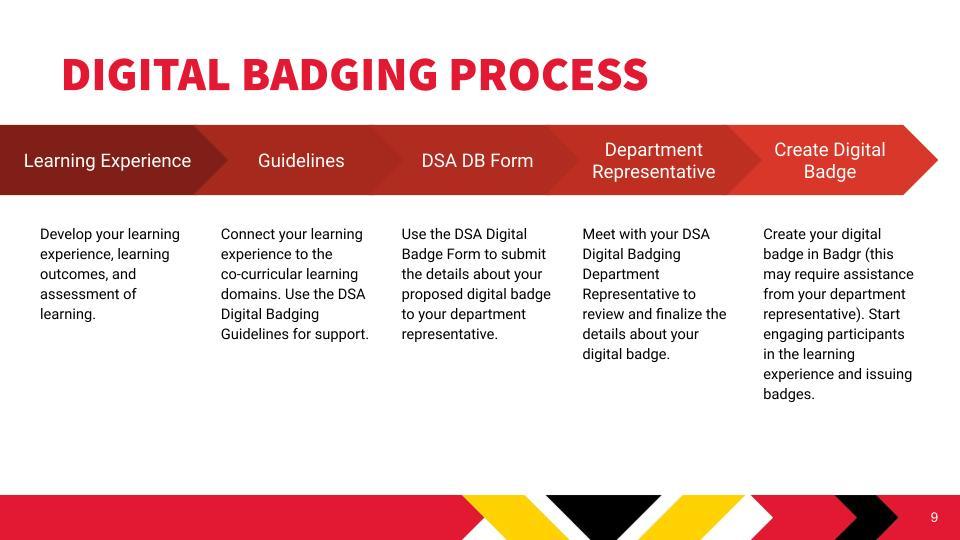
Important steps for successfully creating a digital badge
- Determine whether the return on investment justifies the administrative work required to create, maintain, and issue a digital badge.
- Consult with your department representative at the start of the process and continue checking in throughout planning and development.
- Confirm that all required TLTC trainings have been completed for your staff role before you begin building or issuing badges.
- Before creating your department’s first badge, meet with Joann to determine whether a consultation with TLTC (especially for Canvas Credential integration) is needed to set up your initial badge in Badgr.
Digital Badge Types (Defined by TLTC, listed from basic to complex)
Activity Badge
Tracks student participation or attendance in a learning experience. No assessment is required for this type of badge.
Micro-Credential
Awarded when a student demonstrates a specific skill or competency. Requires an assessment and should include some form of feedback to the student.
Meta-Credential
Recognizes the completion of a series of related skills or learning experiences. Requires an assessment, submission of an artifact or assignment, and direct human feedback.
Critical Coordination Questions for Digital Badge Management
Departments implementing digital badges should consider how their internal processes, staffing structures, and review procedures will support sustainable and consistent badge management across DSA. The questions below can help guide those planning discussions.
- How will your department organize the digital badging roles so that the structure remains easy to maintain?
- Will digital badging be managed centrally, or will individual offices be empowered to serve as editors and badge coordinators?
- Which staff role is appropriate to assign to each team member involved in creating or issuing badges?
- How will your team review badge submissions to ensure they meet badge type requirements?
- What turnaround time will you set for reviewing and issuing badges?
| Role | Responsibilities/Permissions |
|---|---|
| Owner | Add and remove staff; full permissions included below. |
| Editor | Create, edit, delete, and issue badges; can modify issuer details. |
| Staff member | Issue badges; cannot modify issuer details or badge designs. |
Activity Badges and Important Considerations
- Choose badge names thoughtfully so that they are respectful, clear, and do not unintentionally label or stigmatize students.
- Activity badges are issued automatically once the requirements are met, and students cannot decline the badge at the point of issue.
- After a badge is issued, students can remove it from their badge backpack if they prefer not to display it. The backpack is a personal badge repository that is not public unless a student chooses to share individual badges or a collection.
- The list of recipients for a badge is not publicly visible. Only staff with access to the Canvas Credentials backend can view award details.
- Students may request that an organization revoke a badge. In those cases, the badge will no longer appear in the student view, but UMD Badgr records will retain a note that the badge was revoked.
Ongoing Questions and Future Planning
As DSA continues to expand its digital badging efforts, several emerging questions will guide future planning, coordination, and design. These areas of discussion will evolve as additional departments adopt and refine their badge offerings.
- What metadata tags should be added in Badgr to help students search for and discover the most relevant badges within the Terps Learn Everywhere issuer?
- When and how should DSA begin broader communication with departments about new or updated badging processes?
- What workshops or collaborative sessions are needed to support departments in developing strong learning outcomes and consistent badging metadata?